
Free Strategy Guide
The Exact Breakout Strategy Our Entire Team Trades Every Week
Read the complete playbook below and claim your massive software discount at the bottom of the page.
Welcome to the official strategy guide. We are incredibly excited to share this with you.
Our entire team has been trading and refining this specific system for years. I want to show you exactly how we find really clean, explosive trades in the market.
This is where it gets really exciting. The entire strategy is built on pure, logical market mechanics. We are simply looking for moments when the market takes a break.
Below, I will walk you through a clear, step-by-step example on TSLA. You will see how we spot the setup, how we know when it is ready to trade, and exactly how we map out the profit targets so we know exactly where we want to take our money off the table.
Take a couple of minutes to read through this. It is a highly effective way to look at a chart. Then, be sure to scroll down to the very bottom. We set up a massive discount for you on the BreakerBox+ indicator so you can start putting this system to work automatically on your own charts today.
The Secret of the Box
Before we look at a live trade, let's talk about why we draw a box in the first place. Markets breathe in and breathe out. When a stock is trending hard, it is breathing out. When a stock goes completely sideways, it is breathing in.
When a chart moves sideways, it is storing up energy.
Large accounts and institutions are quietly buying or selling shares without pushing the price too far in either direction. They keep the price trapped between a clear ceiling and a clear floor.
The Breaker Box strategy literally draws a box around this trapped energy. The longer the price stays trapped inside the box, the bigger the move usually is once it finally breaks out. The box is everything. It tells us exactly where the boundaries are.
Strategy Walkthrough: The TSLA Setup
A simple 3-step breakdown showing how a box forms, how an entry triggers, and how targets are reached on Tesla (TSLA).
Phase 1: Finding The Range
Spot the Setup
Every good breakout starts with a clear resting period.
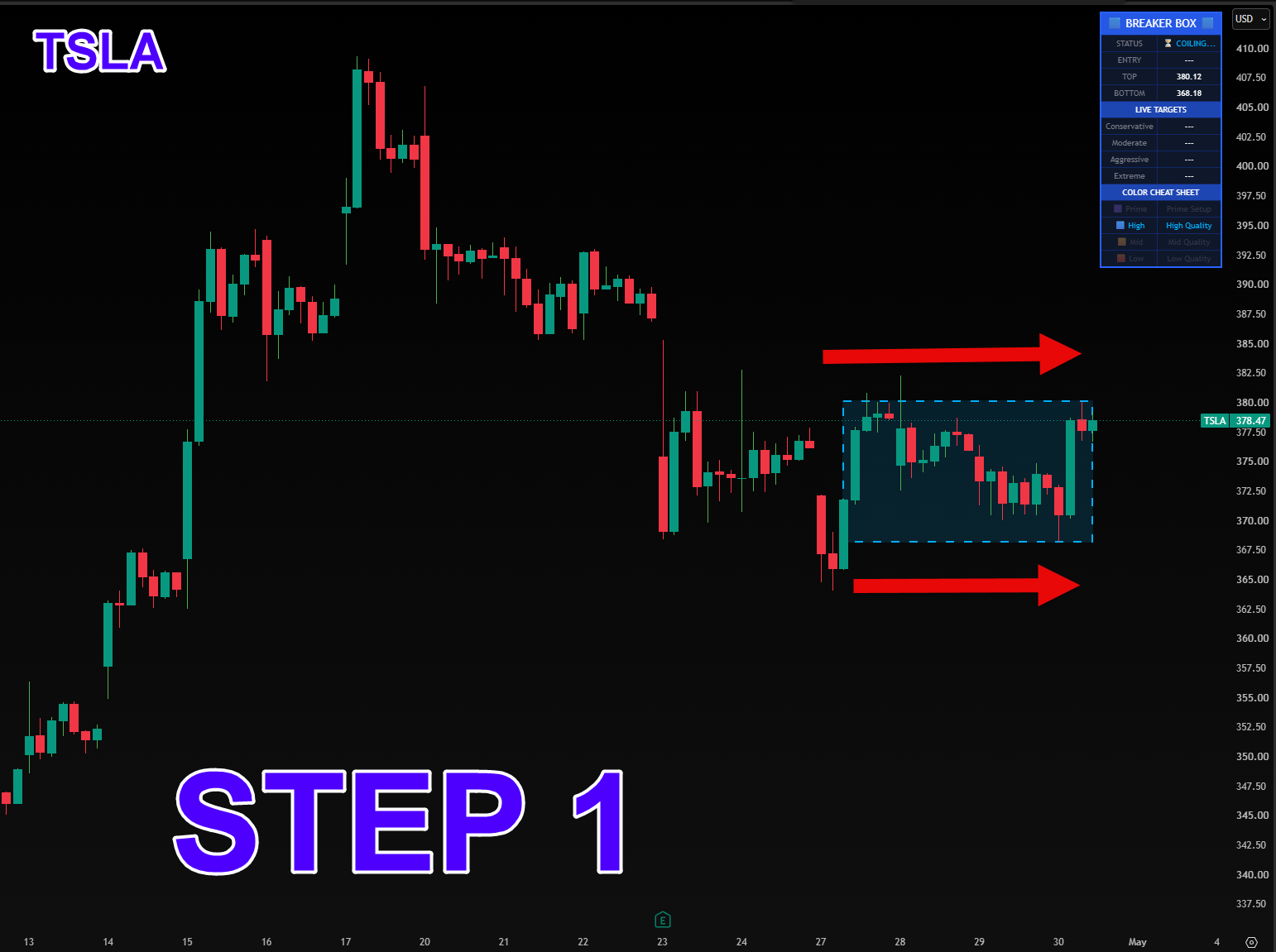
In this first stage on TSLA, you can see the price gets tightly boxed in. It has a clear ceiling at $380.12 and a floor at $368.18.
During this quiet period, larger traders are often stepping in to build a position. We wait patiently while this happens. The BreakerBox+ indicator checks the normal volatility of the stock to confirm that this box is genuinely tight and worth watching.
On the dashboard in the top right corner, the status simply says ⏳ COILING..., and the indicator highlights the area with a dashed blue box. Our color cheat sheet tells us this is a High Quality (Blue) setup because the price has rested here long enough to build a solid base.
Phase 2: Waiting For Confirmation
The Breakout Trigger
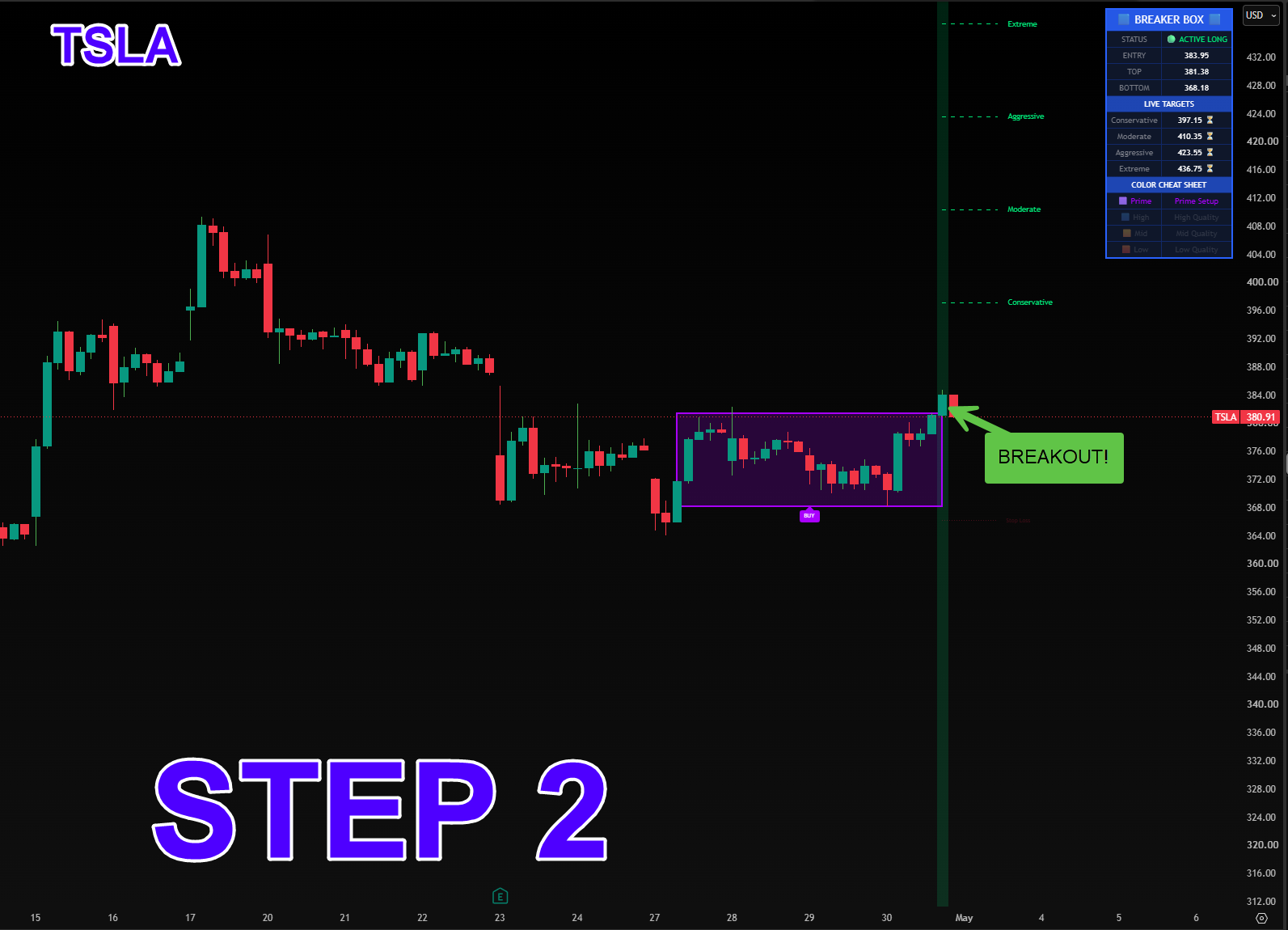
When the stock is ready to move, it will push past our boundaries. You can see a strong green candle breaking cleanly through the top of the box.
To avoid getting tricked by temporary spikes, we wait for the candle to actually close above our buffer zone.
Once that candle closes, the setup is confirmed. The indicator paints a vertical green line across the chart, drops a BUY tag on the screen, and updates the dashboard to 🟢 ACTIVE LONG with an entry price of $383.95.
At the exact same time, the indicator automatically maps out four profit targets overhead: Conservative ($397.15), Moderate ($410.35), Aggressive ($423.55), and Extreme ($436.75). It also draws a helpful dotted red Stop Loss line below the floor of the box to help you manage your risk.
Phase 3: Taking Profits
Managing The Trade
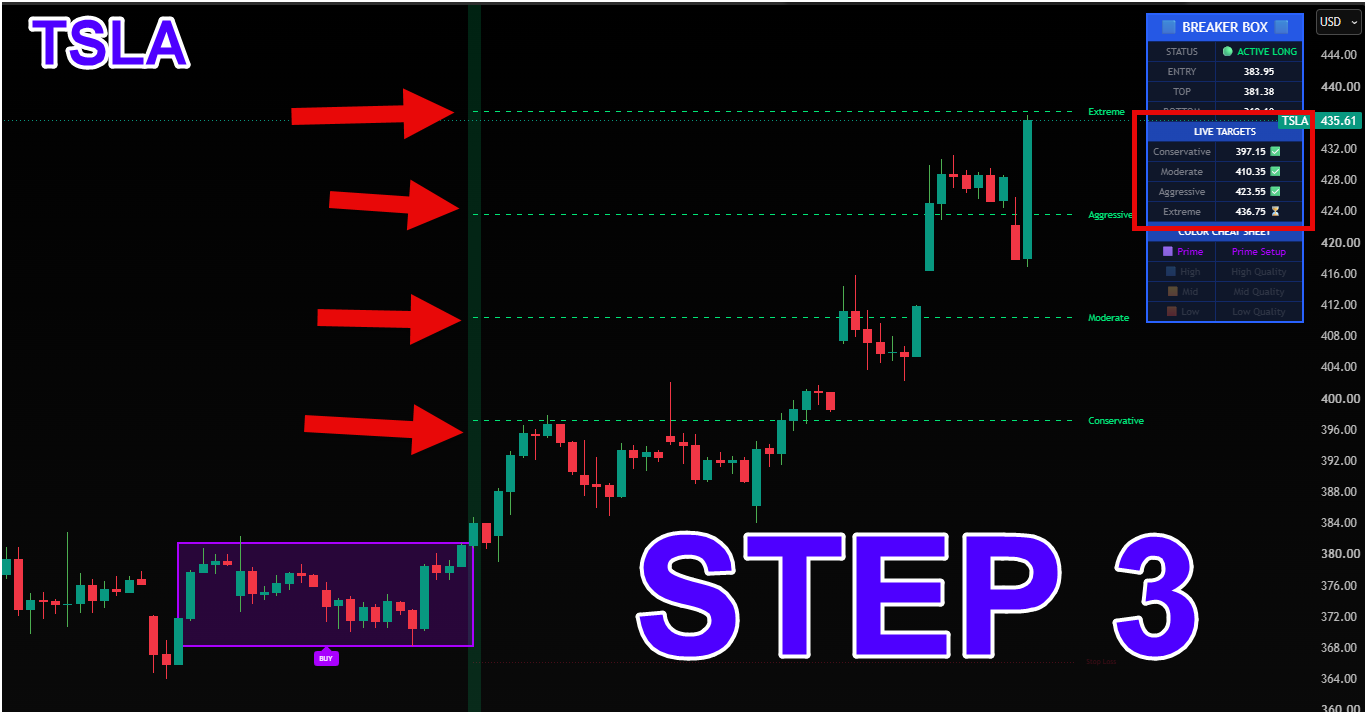
After the breakout is confirmed, TSLA begins a strong upward push. The trade moves nicely through each of the target levels mapped out on the chart.
Look at the dashboard in Step 3. As the price reaches each level, the indicator checks them off for you: Conservative ($397.15) ✅, Moderate ($410.35) ✅, and Aggressive ($423.55) ✅. The stock climbs to $435.61, approaching the Extreme target.
Having these levels mapped out ahead of time helps keep your trading calm and structured. You can take some profits at the Conservative line to secure a win, take more at the Moderate line, and adjust your stop loss upward as the trade progresses.
A Truly Universal Pattern
Our team has relied on this exact pattern for years. We trade it every single week because it simply works. Institutional order flow drives the markets, and that behavior repeats itself universally.
It does not matter if you are looking at stocks, forex, crypto, or futures. Every single market has to pause, build a base, and eventually expand. We love trading this on the 1-hour chart for clean swing setups, but you can drop it down to the lower timeframes and see the exact same pattern playing out perfectly.
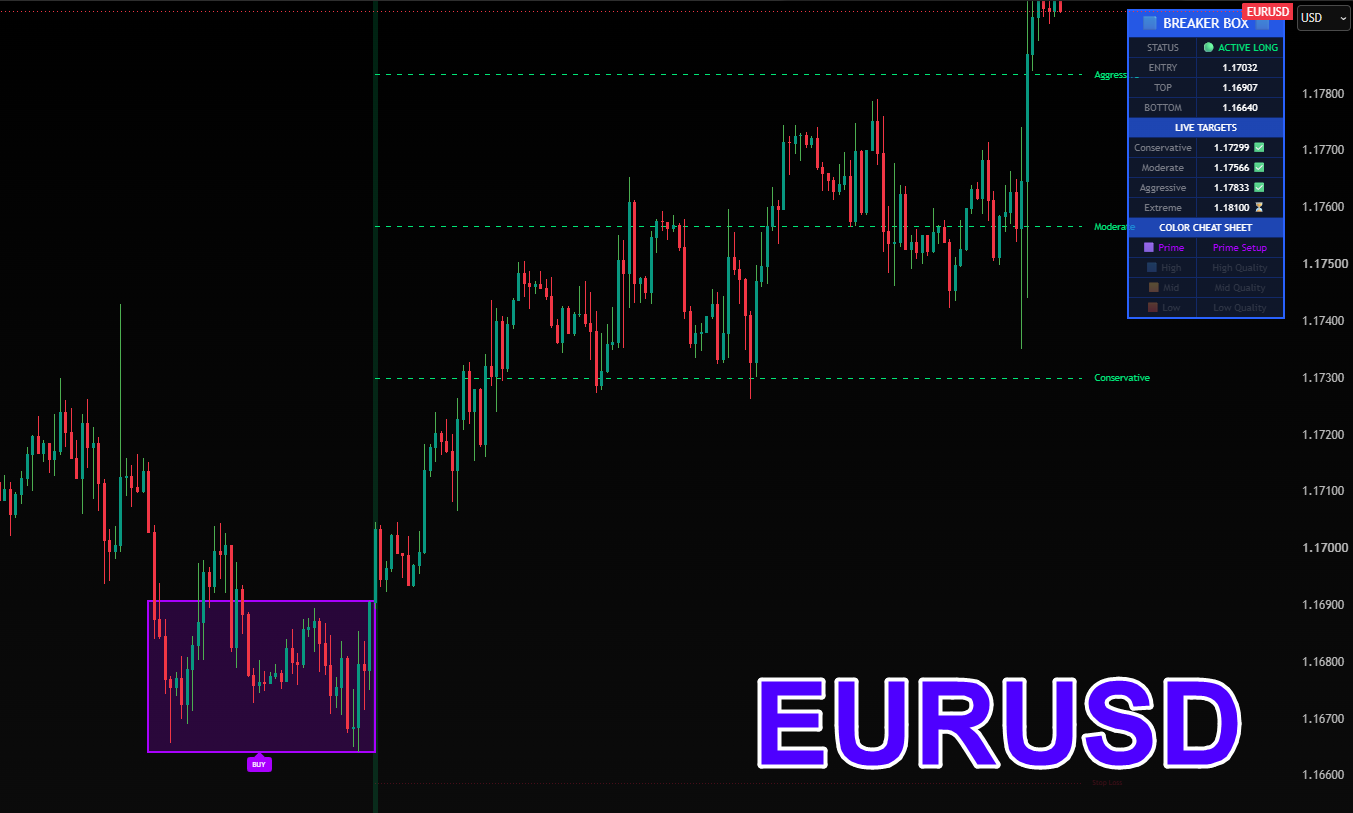
Forex (EUR/USD)
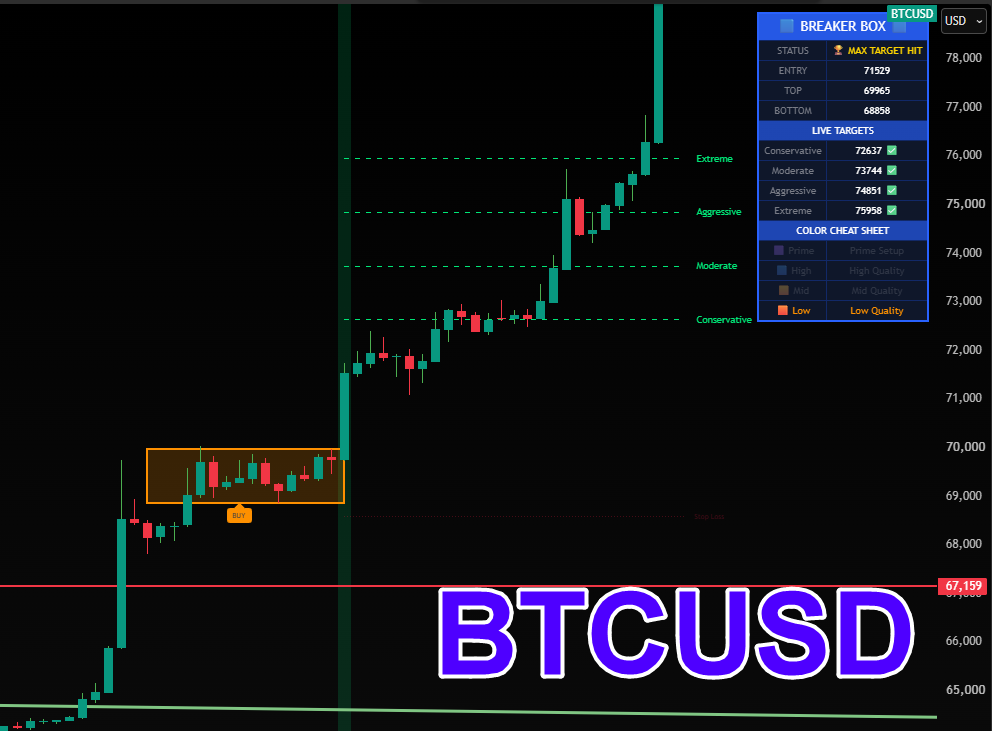
Crypto (BTC/USD)
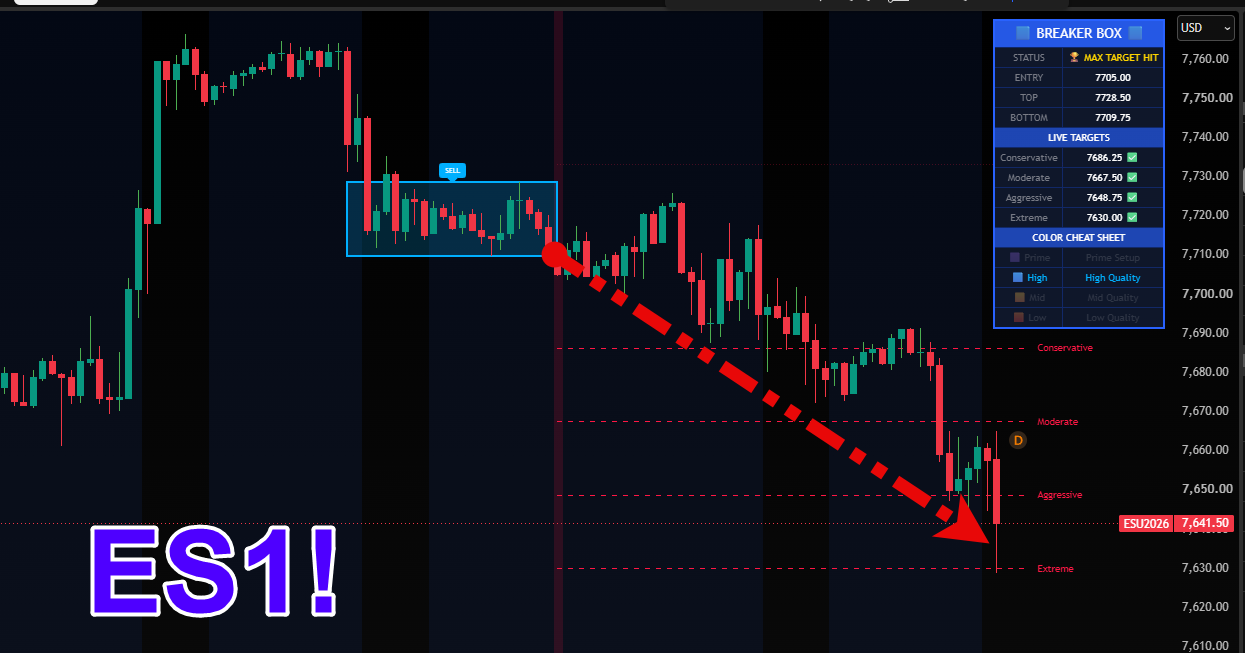
Futures (ES1!)
More Examples From The Market
A quick look at how the indicator handles different stocks and market directions.
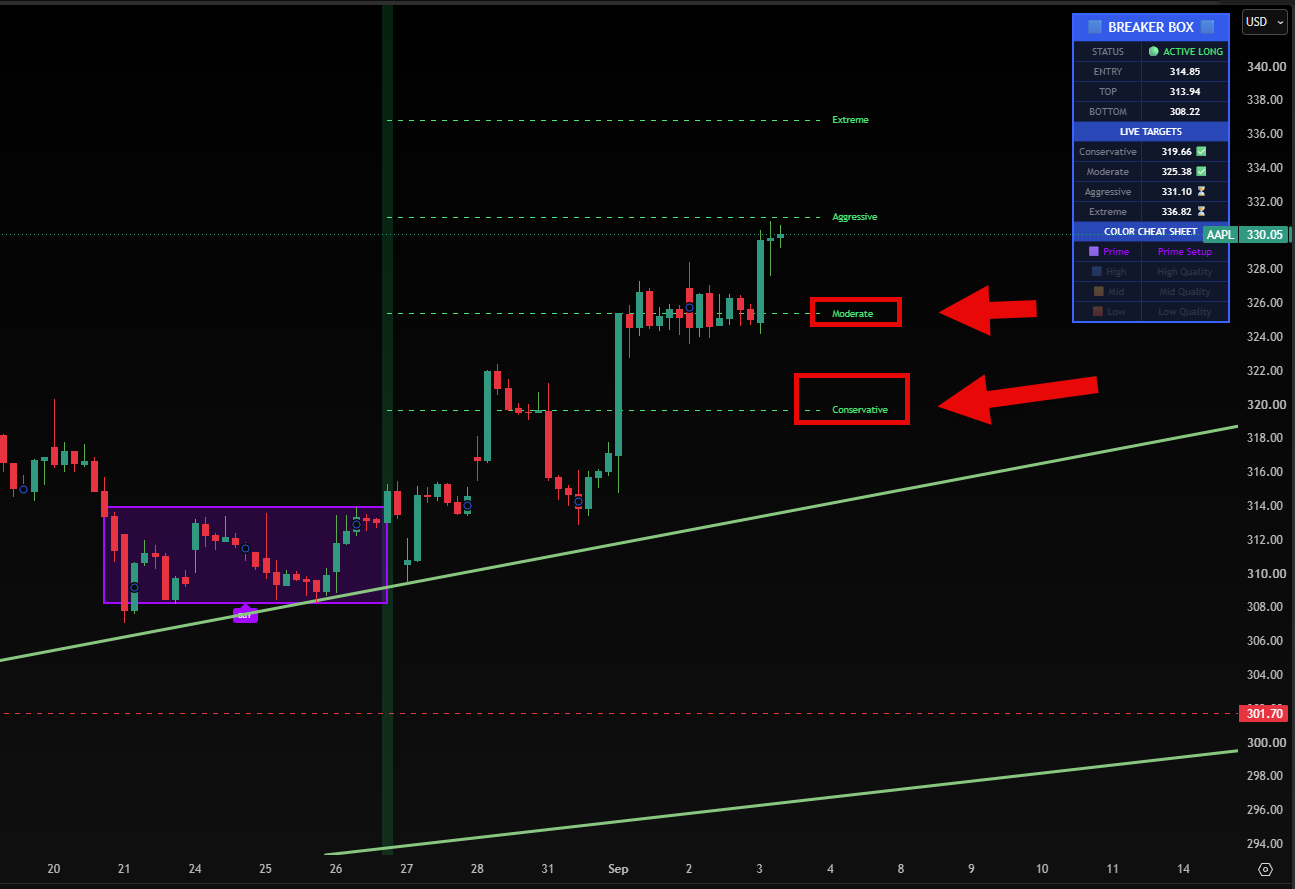
AAPL: Knowing When To Exit
On Apple (AAPL), the indicator found a long resting period and graded it as a Purple Prime setup. After the breakout triggered, the price hit the Conservative level and reached the Moderate target at $325.38.
Right at that Moderate line, the stock stopped moving higher and started trading sideways. Seeing the stock pause directly at a predefined target is a great, clear signal that it might be time to take your final profits and close the trade.
INTC: Riding The Trend
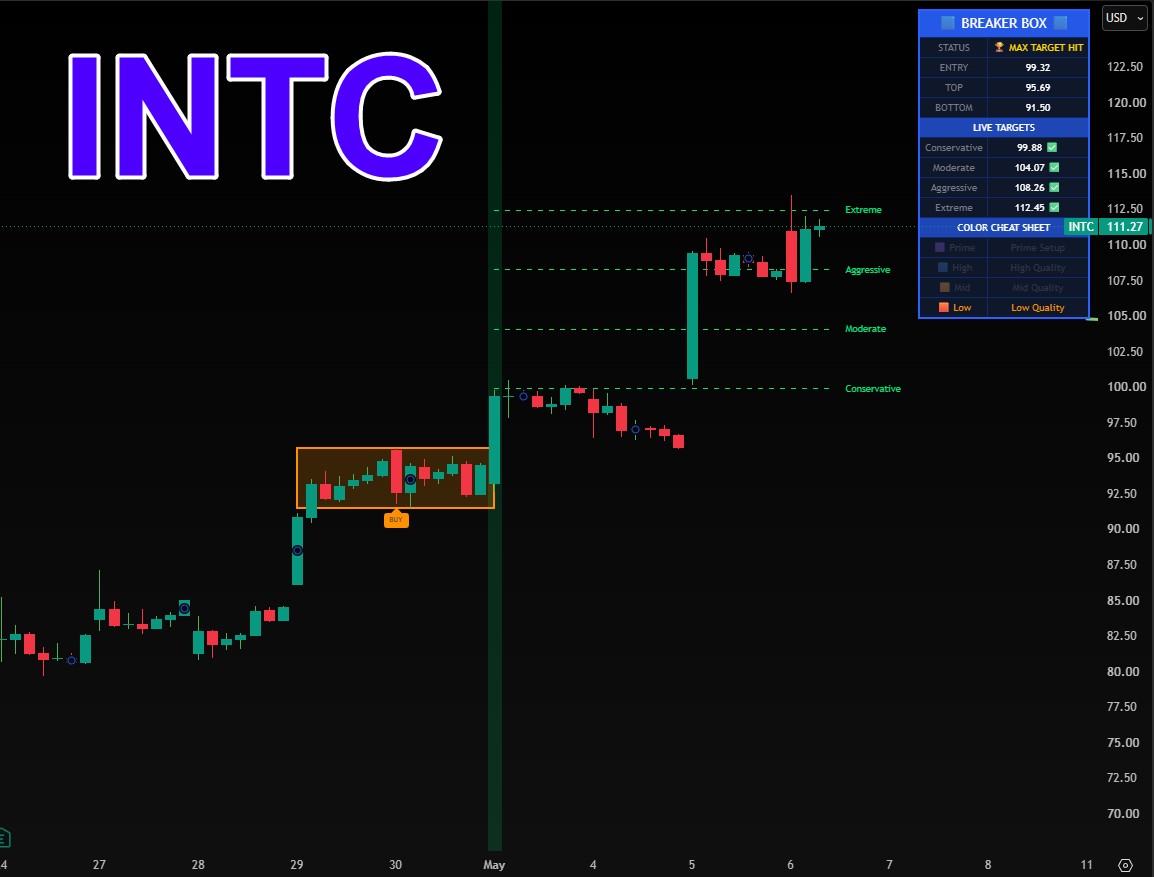
Intel (INTC) formed a nice tight box after an early rally. The indicator checked the background trend, confirmed the breakout, and mapped the levels.
The price moved smoothly upward through the targets, giving the trader very clear areas to secure gains along the way.
MCD: Trading The Downside
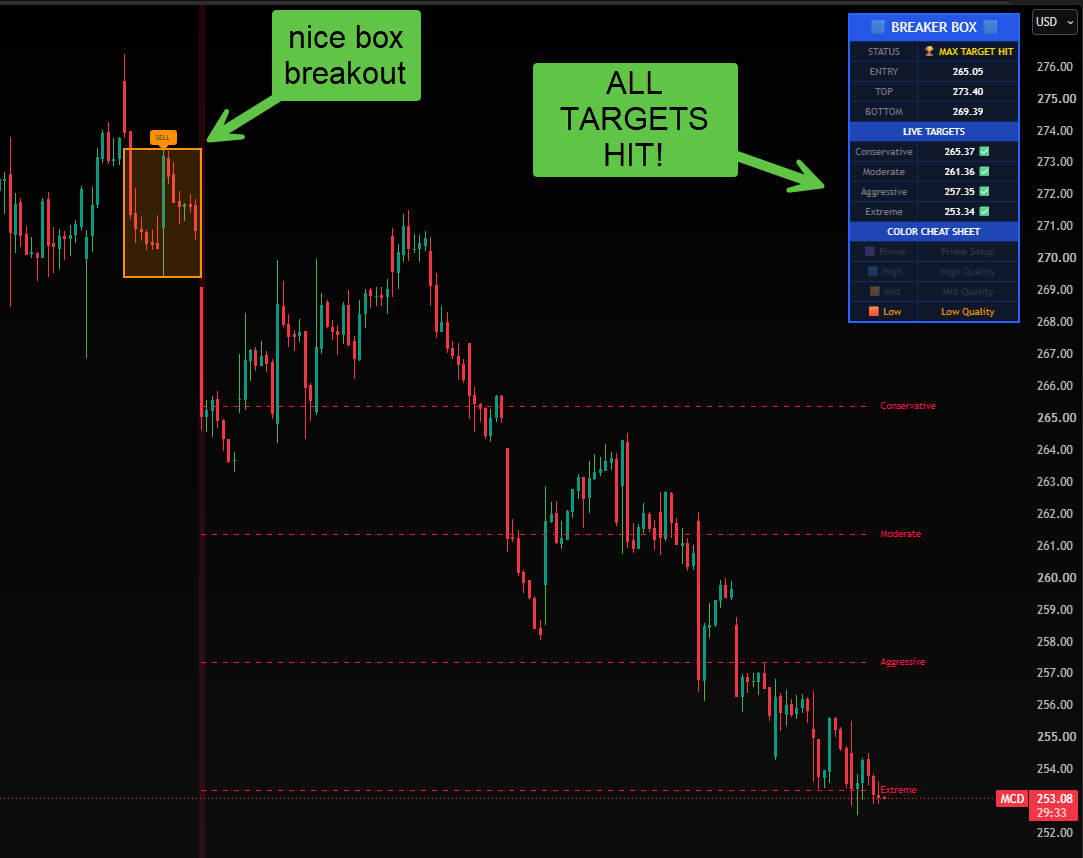
This strategy works for downward moves, too. On McDonald's (MCD), the stock formed a box where buyers struggled to push the price higher.
When the price closed below the bottom of the box, the indicator confirmed a Short setup. It then projected the profit targets downward, mapping the drop beautifully.
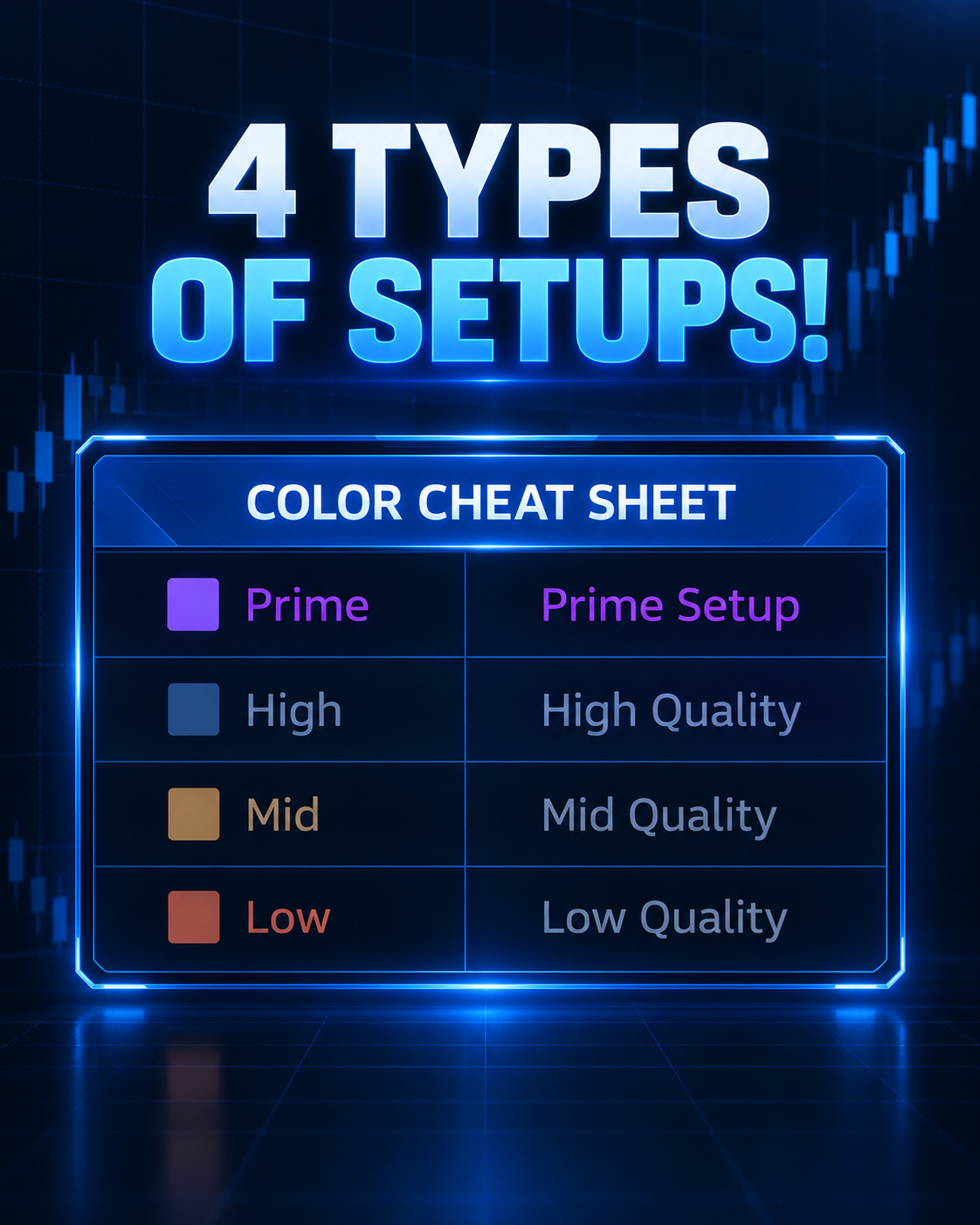
The 4 Setup Types: How We Grade Every Breakout
Every consolidation box provides a great opportunity, but they are all unique in how much energy they have stored. The longer a stock rests within a tight range, the greater the potential power behind the eventual breakout.
The indicator handles this grading automatically right on your HUD dashboard.
Prime (Purple): Maximum Compression
When you see a Prime setup appear on your chart, you really want to pay attention. A Prime box means the price has coiled tightly across 24 or more consecutive candles.
The coiled spring has reached maximum tension. When a confirmed breakout triggers out of a purple box, it frequently produces massive moves that run cleanly through all four profit targets.
High (Blue): Reliable Continuation
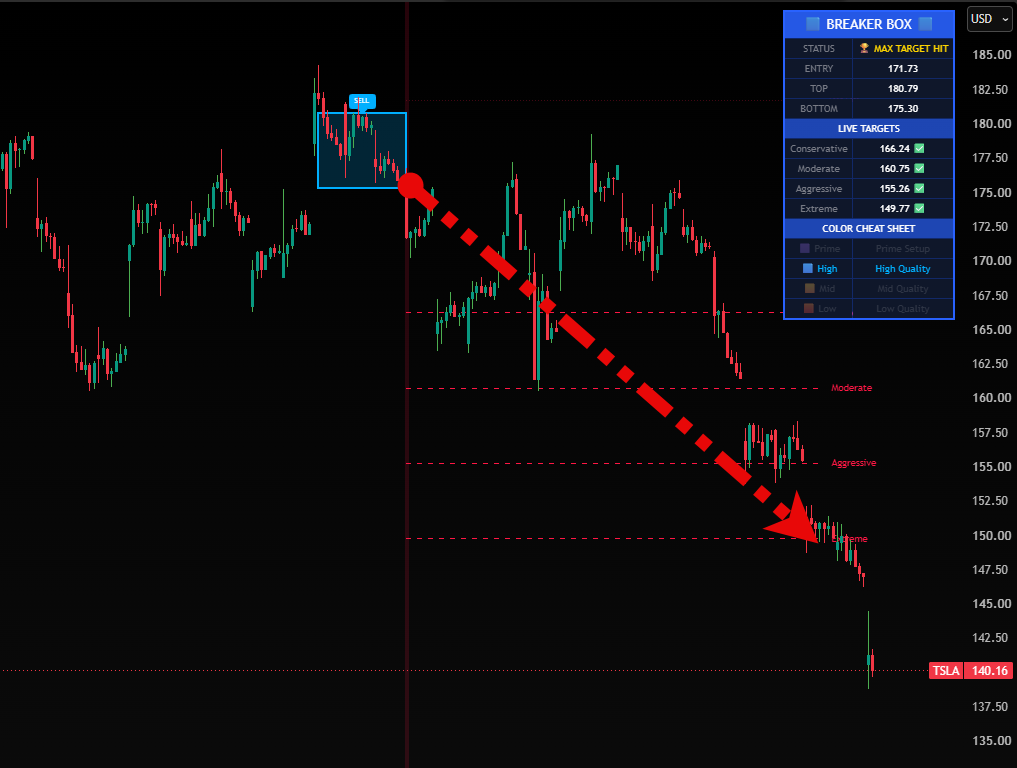
A Blue box indicates 20 or more candles of steady consolidation. These are incredibly dependable setups that build a strong structural base.
As you can see in this short breakout on Tesla, high-quality boxes often create smooth, disciplined moves directly down into the aggressive and extreme target zones.
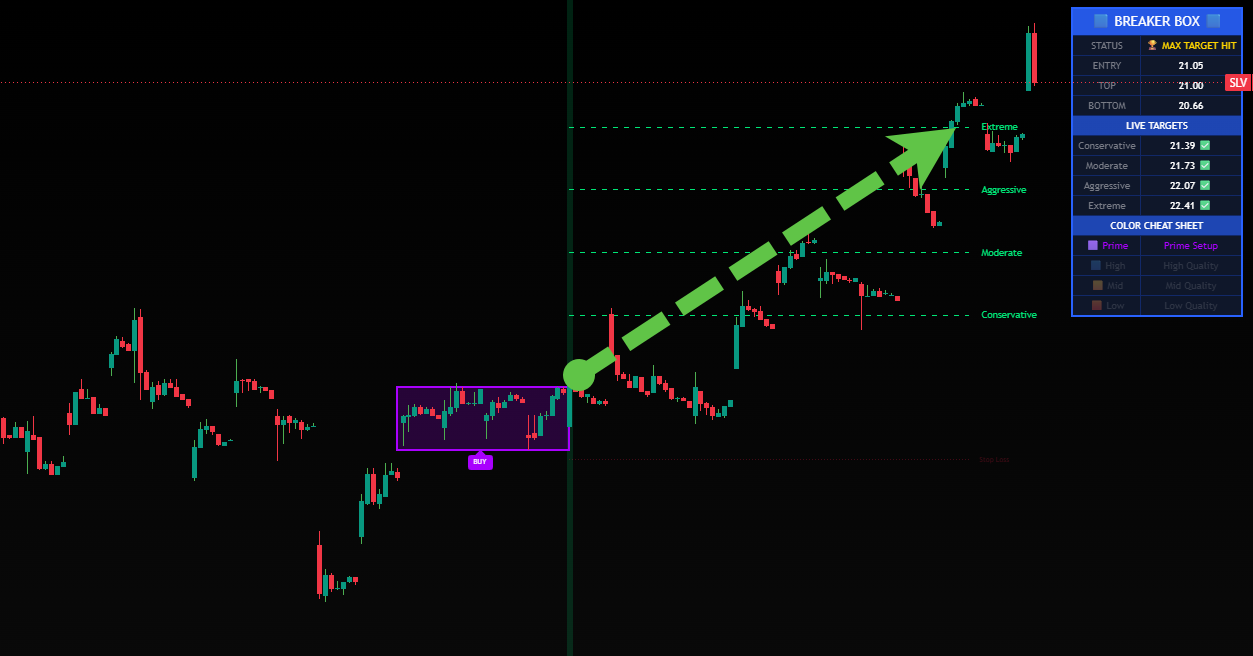
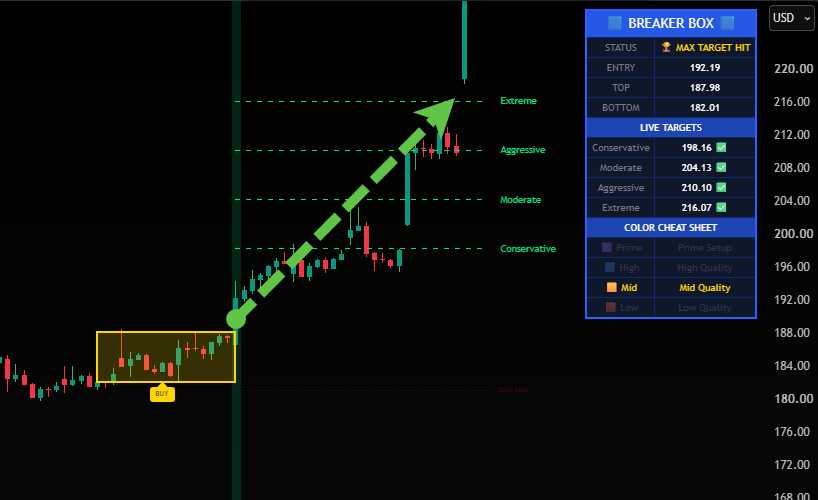
Mid (Gold): Solid Foundation
A Gold box represents a great, standard breakout setup formed after 16 or more candles of tight coiling. The base is clear and structured.
In this long trade, price moved steadily through Conservative and Moderate targets before delivering a powerful expansion up to the Extreme line.
Low (Orange): Rapid Moves
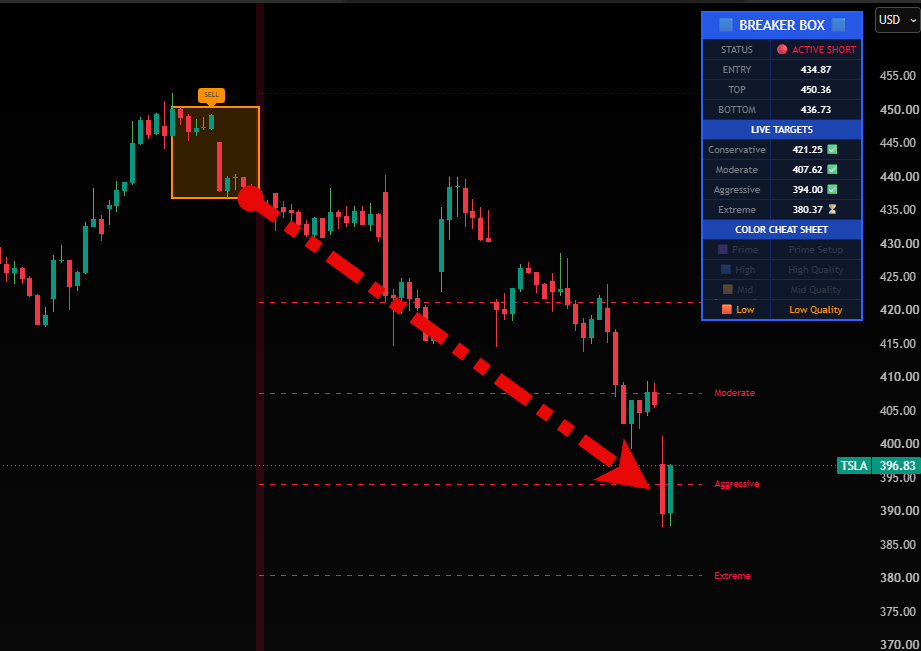
Low quality does not mean a bad setup. It simply means the stock broke out earlier in its consolidation cycle before building a massive base.
These early breakouts can still produce strong runs straight to aggressive targets, as seen in this short trade, while reminding the trader to take early profits at the conservative target.
The Ultimate Chart Upgrade
Introducing BreakerBox+
We built this indicator to give you a complete toolset for tracking consolidation and breakouts. It handles all the complex mapping, filtering, and math automatically right inside TradingView, freeing you up to just look for the best setups.
Intelligent Auto-Tune
The indicator immediately adapts its structure requirements and volatility limits to match whichever timeframe you are actively trading.
Tiered Quality Matrix
The system color-codes your setups as Prime (Purple), High (Blue), Mid (Gold), or Low (Orange) based entirely on how long the price has been resting.
Triple Smart Filters
Helps protect your capital by blocking erratic overnight gaps, requiring strong breakout candle closes, and filtering setups by the macro trend EMA.
Dynamic Target Projection
Anchors four clear profit milestones directly to your verified entry price, helping you maintain logical risk-to-reward ratios on every setup.
Everything You Get Today
We want to make sure you have every tool and resource you need to apply this strategy on your own charts comfortably.
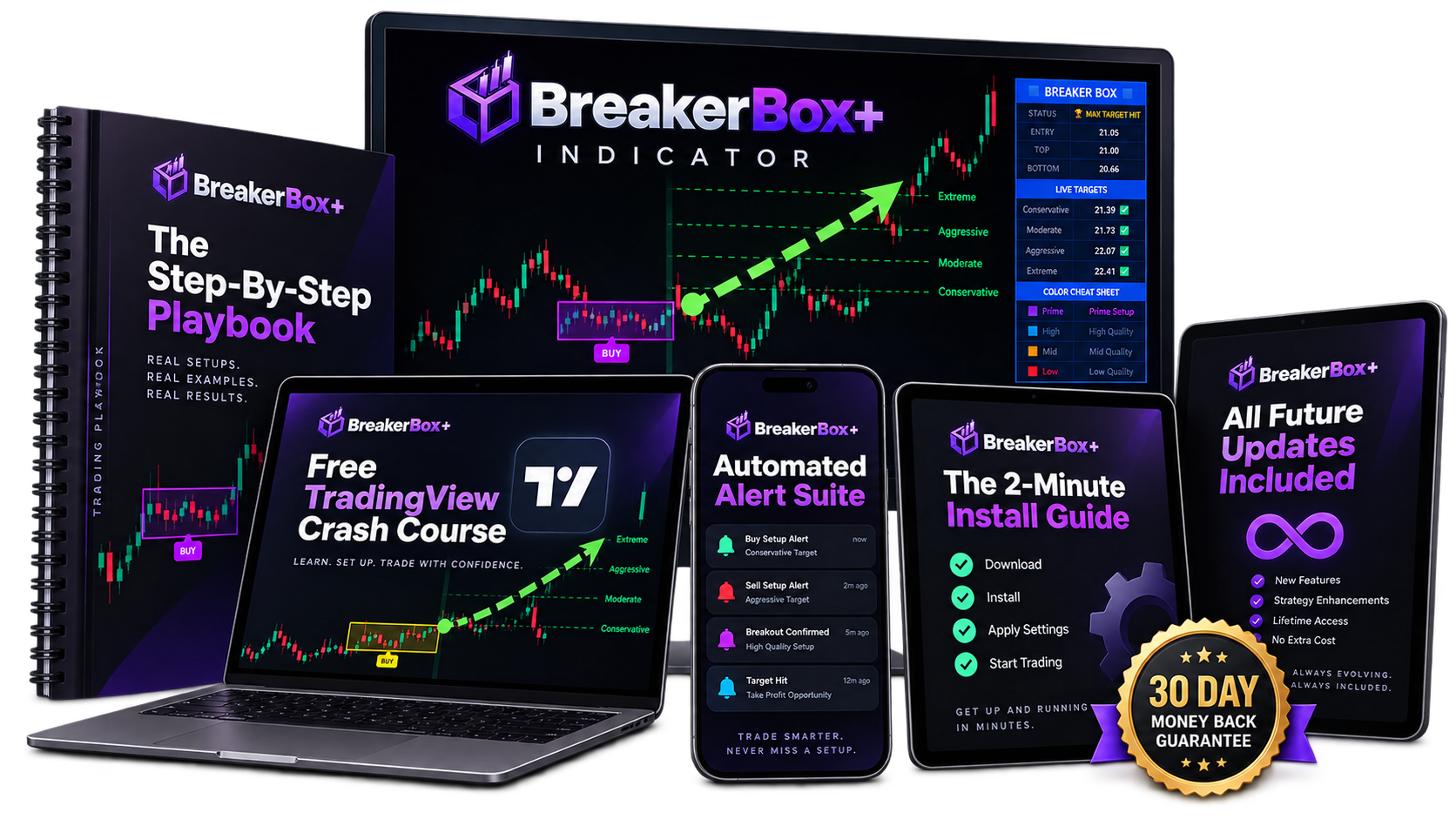
BreakerBox+ Indicator
You get lifetime access to the core BreakerBox+ tool. It finds the tight zones, filters out bad setups, and maps your entry lines right on your chart.
The Step-By-Step Playbook
You get a permanent copy of the complete BreakerBox strategy rules so you always have a clear reference for how to trade the setups.
Free TradingView Crash Course
New to charting? We love helping traders get comfortable. This bonus video course will show you exactly how to navigate TradingView with ease.
The 2-Minute Install Guide
We provide a simple, quick-start guide that walks you through adding the indicator to your chart so you can be up and running in just a couple of minutes.
All Future Updates Included
When we add new features or improve the code for BreakerBox+, you will get those updates automatically for free. Lifetime means lifetime.
Automated Alert Suite
The indicator can transmit fully formatted notifications containing entry, stop loss, and target levels directly to your mobile device.
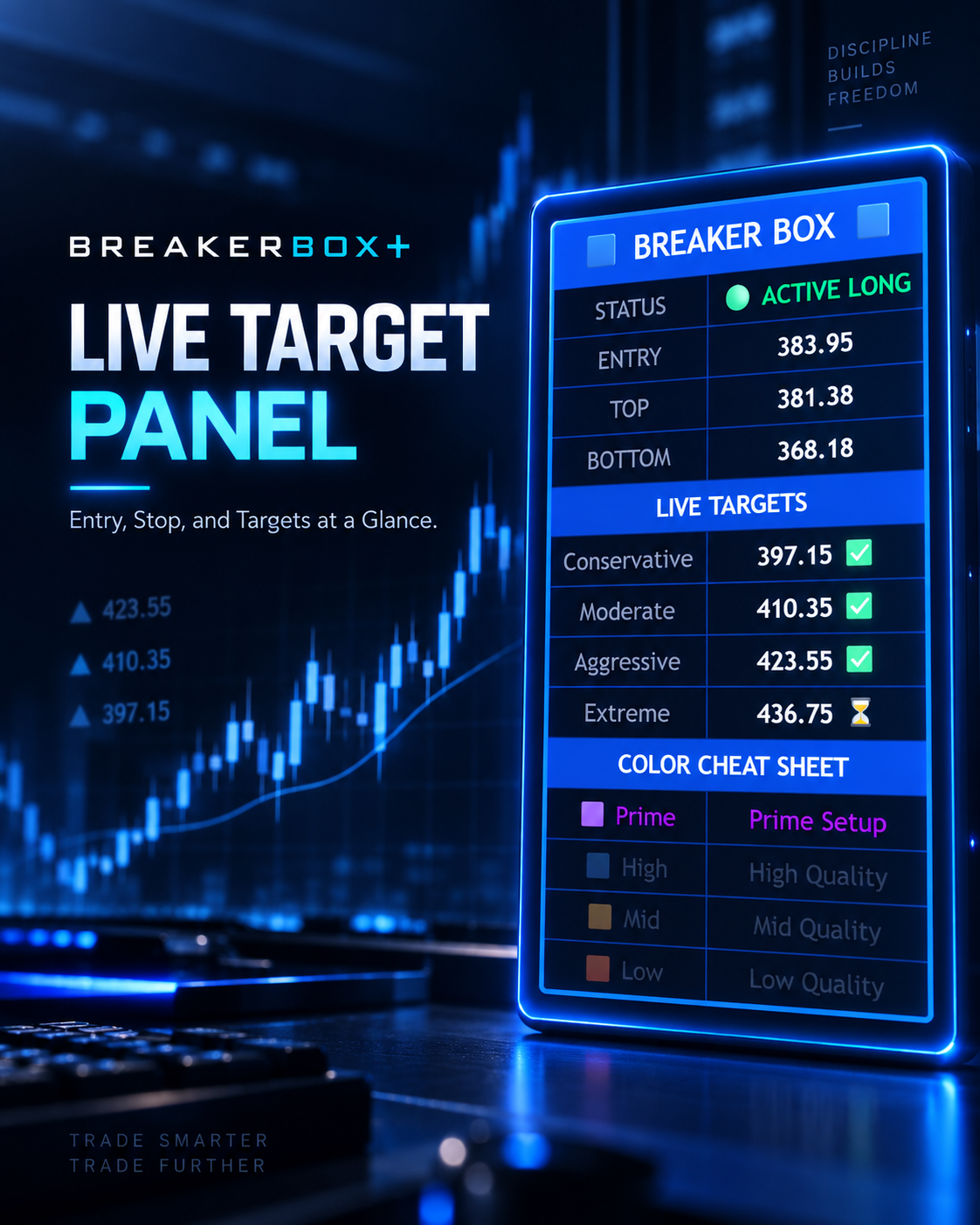
Bonus: The Premium On-Chart Dashboard
The indicator comes with a sleek, built-in display panel. It instantly shows you the current trade status, your exact entry price, the top and bottom of the box, all four live target levels, and a helpful color cheat sheet to grade your setups.
Frequently Asked Questions
Have a few questions before you get started? We have you covered.
Do I need a paid TradingView account to use this?
You can use BreakerBox+ perfectly on the free version of TradingView. You do not need to upgrade your TradingView account to see the boxes, the targets, or the dashboard.
Will I get alerts when a breakout happens?
Yes. The indicator includes a complete alert suite. You can set it to send notifications directly to your phone or computer the moment a setup triggers. The alert will give you the exact entry price, your stop loss, and all four target levels immediately.
Can I set up manual alerts for specific charts?
Absolutely. You have full control to set manual alerts on the specific tickers you want to watch. The system is highly customizable so you can trade your own way and only get notified for the assets you care about.
What markets and timeframes does this work on?
You can apply this to stocks, forex, crypto, and futures. The pattern is universal. While our team loves using the 1-hour chart for swing setups, the built-in Auto-Tune feature adapts the math for any timeframe you prefer to trade.
Is this a monthly subscription?
Your purchase today gives you permanent, lifetime access to the BreakerBox+ indicator. There are no recurring fees or hidden maintenance charges.
Are future updates included?
Yes. Whenever we add new features or refine the code, your indicator will update automatically inside your TradingView account at no extra cost. Lifetime means lifetime.
I am new to TradingView. Is it hard to set up?
The setup takes about two minutes. We include a simple install guide and a quick-start video course to show you exactly how to get your charts looking perfect.
Unlock BreakerBox+ Today
When this tool officially launches to the public, access to the program will cost a premium annual fee.
But because you are here during early access, you are not just getting in before everyone else. You are securing a deal no one else will see again.
You will bypass monthly and yearly fees entirely. You secure everything for one single payment and lock in LIFETIME ACCESS.
- ✖️ NO Subscriptions
- ✖️ NO Rebills
- ✖️ NO Monthly Payments
- ✖️ NO Yearly Payments
That means you can grab BreakerBox+ today, turn on your alerts, dive into the strategy, and start catching breakout trades right away.
And if you are not completely satisfied after a full 30 days of use, I will refund every penny of your investment. Because I believe in this system. I use this system on my own charts every single day. Based on the trades it has delivered, I am completely confident BreakerBox+ will produce for you.
I am putting my money where my mouth is and giving you 30 days to prove it to yourself.
Your Complete Value Stack
Secure Your Access Today For
instantly with coupon code BOX
This is the ONLY page you will ever see this offer!